19 October 2026
WhatsApp Business API for Odisha shops: setup, cost & real examples
How Odisha shops, clinics and service businesses can move from the WhatsApp Business app to the official API: setup steps, how Meta charges, build costs and practical examples.
6 min read
The WhatsApp Business API (officially the WhatsApp Business Platform) lets an Odisha shop run an automated chatbot, a shared team inbox and automatic order updates on one official number, instead of one staff member juggling a single phone. Setup takes a few steps with Meta, a build cost for the bot itself (ours starts from ₹30,000 (~$320)), and Meta's per-message charges, which depend on the type of message you send.
Most shops in Bhubaneswar, Cuttack and Berhampur already do business on WhatsApp — customers ask for prices, send photos of what they want and share UPI screenshots. The free WhatsApp Business app handles this well until you have more than one person replying, more than a few dozen chats a day, or you want order updates to go out automatically. That is the point where the API makes sense.
App vs API: which one do you need?
| WhatsApp Business app | WhatsApp Business API | |
|---|---|---|
| Cost | Free | Build cost + Meta per-message charges |
| Devices | One phone (plus linked devices) | Many agents in one shared inbox |
| Chatbot | Quick replies and greeting only | Full menus, catalogue, booking, payments |
| Order updates | Manual | Automatic from your billing or store |
| Broadcasts | Limited lists | Approved templates to opted-in customers |
| Integrations | None | Website, CRM, Google Sheets, Tally |
If one person handles fewer than about twenty chats a day and nothing needs to be automatic, stay on the app. If you are losing enquiries because nobody replied after shop hours, or staff copy-paste the same price list fifty times a day, move to the API.
How to set it up: six steps
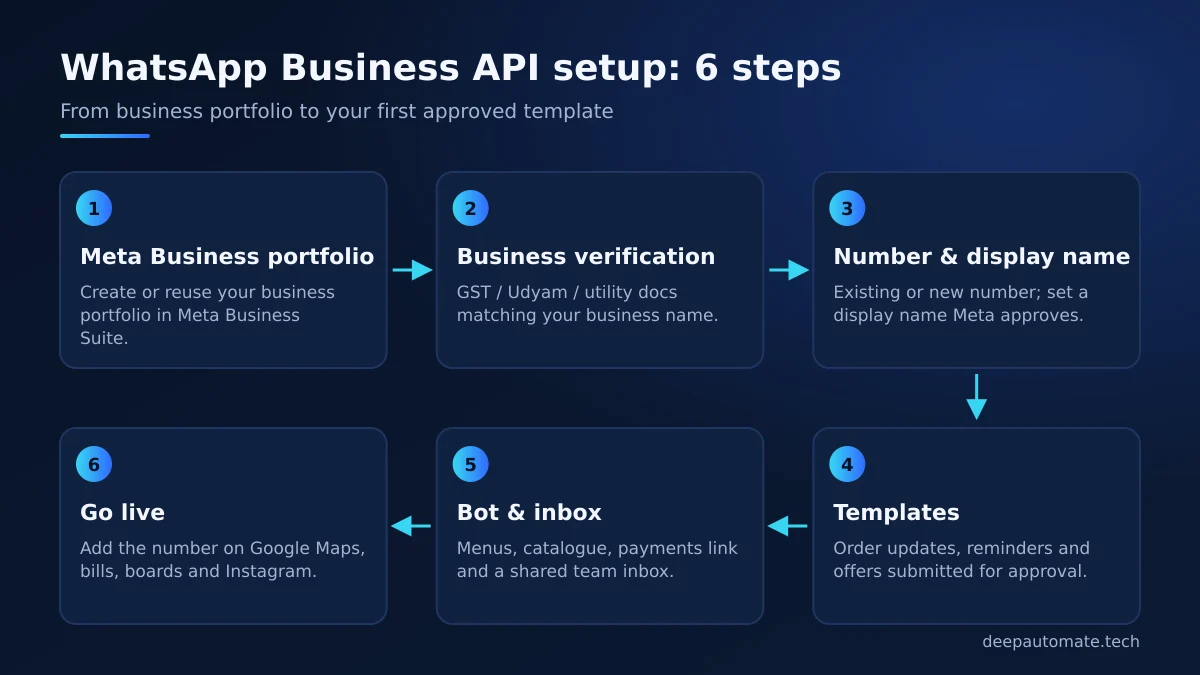
1. Meta Business portfolio
You need a business portfolio (formerly Business Manager) in Meta Business Suite. If you already run Facebook or Instagram ads, you probably have one — use it so everything stays in one place, owned by you.
2. Business verification
Meta checks that your business is real. Keep documents ready that show your exact legal name and address — GST certificate, Udyam registration or a utility bill are common. Make sure the name matches your website and Google Business Profile; mismatches are the most common reason verification is delayed.
3. Phone number and display name
Decide whether to use your existing shop number or a new one. An existing number can usually be migrated to the platform, and Meta also supports connecting some WhatsApp Business app numbers directly; we check what applies to yours. Pick a display name that matches your shop name — Meta reviews it.
4. Message templates
Any message you start (order confirmed, appointment reminder, festival offer) must use a pre-approved template. Replies to a customer who messaged you can be free-form. Write templates in plain, useful language; Odia and English templates are both possible.
5. Bot and inbox
This is the part we build: menus, product catalogue, price list, order capture, UPI payment links, appointment slots and handover to a human. Your staff reply from a shared inbox on a computer or phone.
6. Go live
Put the number everywhere — signboard, bills, Google Maps listing, Instagram bio, packaging. Add a QR code that opens the chat directly.
How Meta charges for WhatsApp messages
Meta moved to per-message pricing on 1 July 2025. According to Meta's official WhatsApp pricing page, each delivered message is charged by category and by the recipient's country code:
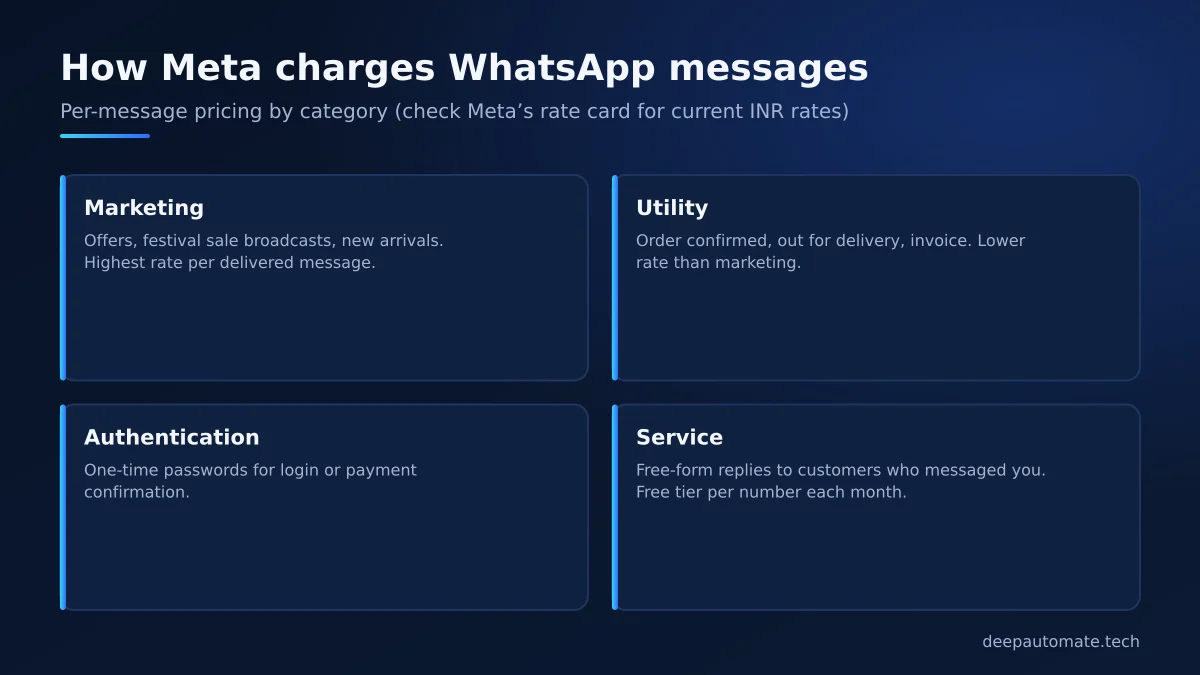
- Marketing — offers, new arrivals, festival broadcasts.
- Utility — order confirmations, delivery updates, invoices.
- Authentication — one-time passwords.
- Service — free-form replies inside the 24-hour window after a customer messages you.
Two recent changes on that page matter for Odisha shops. From 1 October 2026, Meta says each business phone number gets a free tier of 1,000 delivered service messages per month, with charges after that, and utility templates sent inside an open customer service window are now charged at the regular rate. Meta also says India billing in INR is available, with eligible accounts required to move to INR by 31 December 2026.
Meta's page does not list rupee amounts directly — the current India rates are in the rate card linked from it. These rates change regularly, so check that page before you budget, and be wary of anyone quoting fixed per-message prices without a source. For a full breakdown of build vs running costs, see our guide on WhatsApp chatbot cost in India.
Real examples from Odisha businesses
These are typical flows we design; you can try similar ones yourself in our WhatsApp bot demo, which includes sweet shop, clinic and real estate personas.
Sweet shop in Cuttack
A customer types "Hi", sees categories (rasagola, chhena poda, gift boxes), picks quantities, chooses pickup or delivery, and gets a UPI link. The counter sees each order on a screen. During Durga Puja and Diwali, a template message to past customers announces gift box pre-orders. More detail in our post on WhatsApp ordering for restaurants and sweet shops.
Diagnostic centre in Berhampur
Patients choose a test, see preparation instructions (for example, fasting), book a home sample collection slot and receive a "report ready" message with a secure link. Front-desk calls drop, and staff spend their time with patients in the centre.
Hardware store in Bhubaneswar
Contractors send a list; the bot confirms stock against a Google Sheet, shares a quote, and hands over to a salesperson for bulk pricing. Every quote is logged, so follow-ups do not slip.
Mistakes to avoid
- Using unofficial tools. Browser-automation tools that "send bulk WhatsApp" on a normal number risk getting the number banned. Use the official platform.
- Messaging people who did not opt in. Keep a clear opt-in on your website, bills or in-chat. Meta can limit numbers that get many blocks or reports.
- Letting an agency own your account. The business portfolio, number and templates should belong to you.
- No human fallback. Always give a "talk to a person" option.
- Ignoring after-hours chats. The bot should at least capture the customer's name, need and preferred callback time when the shop is closed, so your team can pick up the next morning with full context instead of a bare "Hi".
Ready to move your shop to the API?
If you want a WhatsApp setup that you fully own, built on the official platform, see our pricing or message us on WhatsApp at +91 79788 39679 with what your customers usually ask. You can also reach us through the contact page, Monday to Saturday, 10am–7pm IST.
Frequently asked questions
What is the difference between the WhatsApp Business app and the WhatsApp Business API?
The app is free and runs on one phone, which works for a small shop. The API (WhatsApp Business Platform) lets you add a chatbot, a shared team inbox, automatic order updates and integration with your billing or CRM, and Meta charges per message by category.
Can I use my existing shop number for the WhatsApp API?
Usually yes. Depending on your setup, the number is either migrated to the API, or connected to the API while you keep using the WhatsApp Business app where Meta supports this. Some businesses simply take a new number for the API. We check which option fits during setup.
How much does Meta charge for WhatsApp messages in India?
Meta charges per delivered message based on category (marketing, utility, authentication, service) and the recipient country. Rates change from time to time, so always check the current India rate card linked from Meta's official pricing page.
How much does it cost to build a WhatsApp bot for my shop?
Our official-API WhatsApp bots start from ₹30,000 (~$320) and typically take 2–3 weeks. Meta's message charges are separate and paid to Meta.
Do I need GST registration for WhatsApp Business API verification?
Meta asks for documents that prove your business name and address. GST certificates, Udyam registration and utility bills are commonly used; the exact accepted documents are listed in Meta's business verification help pages.